
Choosing a Solution
Contents
Choosing a Solution#
NeurEco offers different solutions for different types of problems. Each solution contains templates optimized for specific use cases. This guide will help you choose the right solution and template for your problem.
Solutions Overview#
NeurEco provides three main solutions:
Solution |
Use Case |
Templates |
|---|---|---|
Tabular |
Static models where inputs and outputs are sets of scalar parameters |
Regression, Classification, Compression |
Dynamic |
Time-series problems where inputs and outputs evolve over time |
ODE, Convolutional Dynamic |
PFS |
Frequency responses of parameterized systems |
Parametric Frequency Sweep |
Decision Flowchart#
Use the following flowchart to determine which NeurEco solution and template best fits your problem:
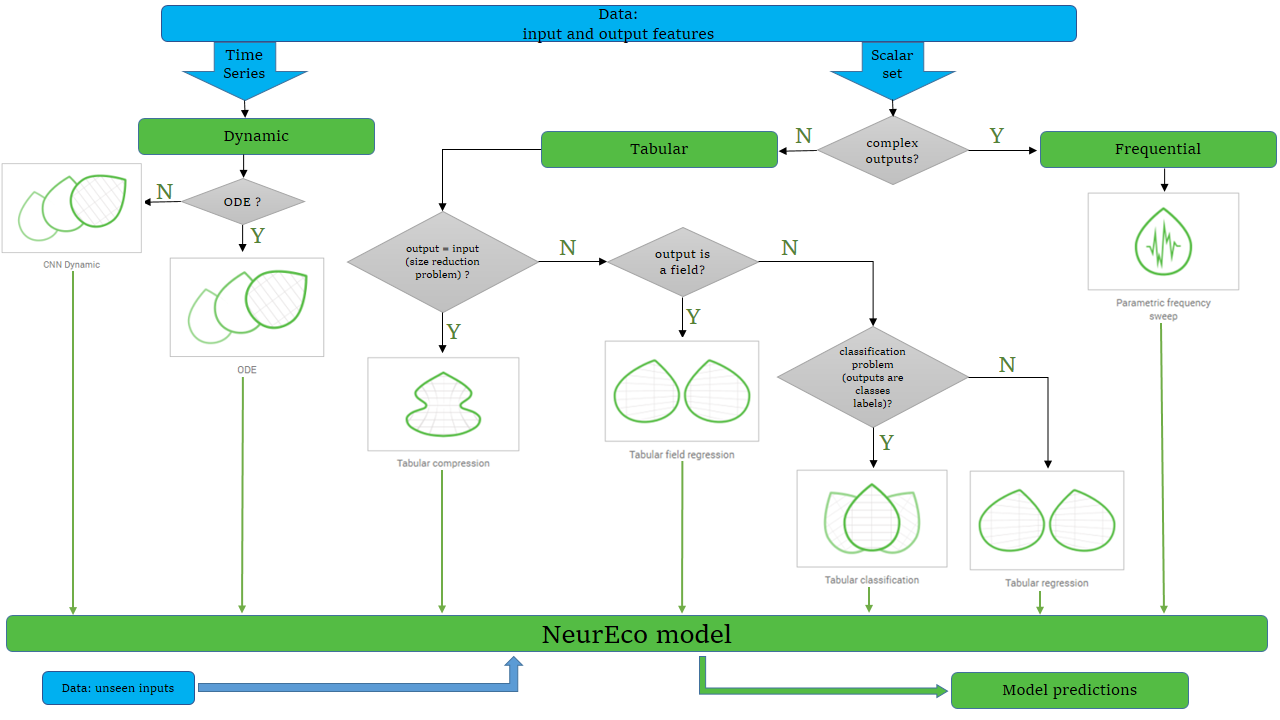
Decision flowchart for choosing the right NeurEco template#
Tabular Solution#
The Tabular solution generates static ANN models. Both input and output features are sets of scalar parameters.
When to use Tabular:
Your data is tabular (rows and columns)
Each sample is independent (no time dependency)
You want to predict output values from input features
Regression Template#
Use Regression when:
Your output is a continuous numerical value
You want to predict quantities like temperature, energy, price, etc.
Example: Predicting energy consumption of a house based on temperature, wind speed, humidity, etc.
Classification Template#
Use Classification when:
Your output is a category or class label
You want to classify inputs into discrete groups
Example: Classifying cancer types based on RNA gene expression data.
Compression Template#
Use Compression when:
You want to reduce the dimensionality of your data
You need to compress and decompress signals
You’re working on IoT applications requiring data reduction
Example: Compressing sensor measurements for efficient data transmission.
Dynamic Solution#
The Dynamic solution generates models for time-series data where inputs and outputs evolve over time.
When to use Dynamic:
Your data involves sequences or trajectories
Time dependencies exist between samples
You’re modeling systems that evolve over time
ODE Template#
Use ODE (Ordinary Differential Equations) when:
You’re modeling continuous-time dynamical systems
Time steps are not fixed
You need to capture differential relationships
Example: Modeling physical systems like oscillators, motors, or biological processes.
Convolutional Dynamic Template#
Use Convolutional Dynamic when:
You’re working with discrete time-series data
Time steps are fixed
You need to capture temporal patterns in sequential data
Example: Signal processing, sequence prediction, time-series forecasting.
PFS Solution (Parametric Frequency Sweep)#
The PFS solution generates static ANN models for frequency domain problems.
When to use PFS:
Your inputs include scalar parameters plus a frequency
Your outputs are complex (real and imaginary parts)
You’re modeling frequency responses of systems
Example: Modeling the frequency response of electromagnetic systems or mechanical structures.
Quick Reference Table#
I need to… |
Solution/Template |
Notes |
|---|---|---|
Predict a continuous value |
Tabular / Regression |
Most common use case |
Classify into categories |
Tabular / Classification |
Discrete output labels |
Compress/decompress data |
Tabular / Compression |
Dimensionality reduction |
Model a continuous-time system |
Dynamic / ODE |
Variable time steps |
Model a discrete-time sequence |
Dynamic / Convolutional |
Fixed time steps |
Model frequency responses |
PFS |
Complex outputs |
Still Unsure?#
If you’re still unsure which solution to use:
Start with Tabular Regression if your data is tabular and outputs are numerical
Try Dynamic ODE if your data involves time sequences
Contact support@adagos.com for guidance on complex use cases
Next Steps#
Once you’ve identified your solution and template:
Build your first model using the Energy Consumption example
Explore the detailed documentation for your chosen solution in the Solutions Guide